A roadside screen never shows your ad on its own: it plays a loop, and you rent a slice of that loop. Digital out-of-home (DOOH) is the IAB's name for digital media used for marketing outside the home, from motorway boards to screens in stations, malls and gyms. Buying it is easy now. Knowing what you paid for takes three numbers: your share of the loop, the audience behind one play, and the log that proves the play happened.
The short answer
A DOOH "impression" is not one screen view. In a programmatic bid, one play of your spot arrives priced as a multiple of people, and a field in the request says who measured that number. Ask which kind of impression the multiplier counts, pay on logged plays rather than booked ones, and get the proof-of-play file per screen.
- $3Bexpected size of the U.S. DOOH market in 2025, per the IAB DOOH Measurement Guide
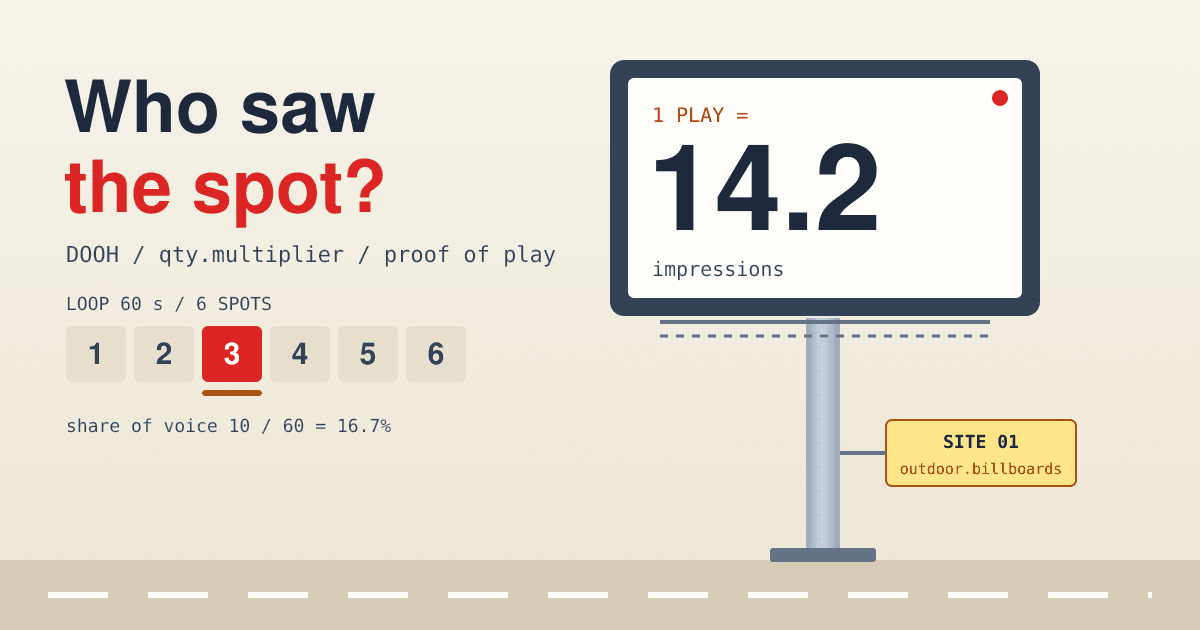
- 14.2the example multiplier in the OpenRTB 2.6 spec: one DOOH play counted as 14.2 impressions
- 1 s / 2 stime fully on screen for a viewable static ad and a viewable video ad, in the MRC Out-of-Home Measurement Standards
The loop: what one spot actually buys
A digital screen runs a playlist on repeat. The seller fixes how long the loop is and how long each ad unit is, and the MRC standards (December 2025) list both as facts a seller should state about each display, next to its days and hours of operation. Your share of voice is your spot length divided by the loop length.
A worked example, not a market figure: a 60-second loop with six 10-second spots.
- 110 s
- 210 s
- 3yours
- 410 s
- 510 s
- 610 s
- Share of voice10 / 60 = 16.7%
- Plays per screen per hour3,600 / 60 = 60
- Plays per screen, 18 operating hours60 x 18 = 1,080
The operating hours matter more than they look. The MRC says display operating times must be defined and factored into impression counts. A screen that switches off at midnight, or sits dark for a repair, plays nothing, whatever the booking says.
What an impression means on a billboard
On a website one impression is one ad served to one browser. A screen beside a road is seen by whoever passes, so the industry counts people near the screen, and the MRC standards set out a ladder of stricter counts:
- Gross impressions. Potential exposures: someone is present in the screen's exposure zone while the ad plays and the display works.
- Viewable impressions (opportunity to see). Gross, plus a viewability condition: 100% of the ad on screen for one second for a static ad, two continuous seconds for video. An obstruction cancels the count.
- Likelihood to see. Viewable, adjusted for the chance that the person actually noticed the ad.
- Audience. The unique people behind those impressions, not the number of times they passed.
Each rung is a smaller number than the one above it, for the same play. Two sellers can quote the same price per thousand and mean different rungs. Viewability on the web works differently, so do not carry its thresholds across.
The multiplier in a programmatic bid
Programmatic DOOH needed a way to sell one play as many impressions. OpenRTB 2.6 added a qty object for it. Its multiplier is "the quantity of billable events which will be deemed to have occurred if this item is purchased", with the spec's own example of a DOOH play counted as 14.2 impressions. Two fields say where the number comes from: sourcetype (who measured it, for example the publisher or a measurement vendor) and vendor (the vendor's domain). After the auction, the AUCTION_MULTIPLIER macro reports the impressions won, which should never exceed the multiplier sent in the request.
| Step | Sum | Result |
|---|---|---|
| Price of one play | $8 x 14.2 / 1,000 | $0.1136 |
| Impressions from 500 plays | 500 x 14.2 | 7,100 |
| Cost of 500 plays | 7,100 / 1,000 x $8 | $56.80 |
| Same plays if the multiplier counted viewable, at a lower 9.0 | 500 x 9.0 / 1,000 x $8 | $36.00 |
The last row is invented to show the effect: the CPM is the same, the bill moves with the rung the multiplier counts. Ask for it in writing.
Four ways to buy screens
The routes are the ones you know from web and video buying, with screens instead of pages. What changes is the unit: a play, scheduled ahead, at a place.
-
01Direct from the media ownerbooked
You book a share of the loop on named screens for set weeks, often at a package price. Simple to plan, and the proof-of-play terms are whatever you negotiate.
Ask: loop length, spot length, operating hours and the screen list, in the order.
-
02Programmatic guaranteedfixed
The same booked plays, delivered and billed through a buying platform. You keep the guarantee and get the platform's reporting.
Ask: whether billing follows the platform's logged plays or the owner's schedule.
-
03Private marketplace dealdeal ID
A seller groups screens into a deal and gives you an ID to bid on, as in the programmatic deal types guide. Nothing is guaranteed; you bid for plays as they come up.
Ask: the multiplier source behind the deal, and how often it is refreshed.
-
04Open auctionbiddable
Screens offered to any bidder. The bid request carries a
doohobject instead of a site or app object, a venue type from the OpenOOH venue taxonomy (11 parent types such as transit, retail and outdoor, down to codes likeoutdoor.billboards), and adttimestamp for when the play is expected to run.Ask: the venue types and markets the seat can reach, before you set a budget.
The dt field is the quiet difference from web buying. A web ad renders the moment it wins. A DOOH play is often sold ahead of the moment it runs, so the screen can still go dark, freeze or skip between the win and the play. That gap is what the log has to close.
Proof of play: the log behind the invoice
The MRC is direct about it: there must be "strong evidence of proof-of-play (PoP)" behind any gross impression or audience figure. For digital screens, the player software that logs what it plays can do the job, but the standards say those methods should be tested and validated before use, monitored after, and subject to independent audit. The same standards define an affidavit as "legitimate proof of posting by the vendor that the advertiser's message ran as scheduled", and list a play log among the things it can hold.
The MRC does not fix the fields of a log file; it says buyer and seller should agree before the campaign what counts as acceptable proof. A usable file has one row per play. An example, with made-up IDs:
played_at (UTC)screencreativesecstatus2026-11-21 07:00:20SCR-0417CR-8810played2026-11-21 07:01:20SCR-0417CR-8810played2026-11-21 07:02:20SCR-0417CR-884cut short2026-11-21 07:03:20SCR-0417CR-880screen off2026-11-21 07:04:20SCR-0418CR-8810played
Two flagged rows, two questions. A 4-second play of a 10-second spot is not a full play. A screen that was off delivered nothing. Count them, compare against the plays you were billed for, and multiply only the full plays.
- Plays booked against plays logged, per screen and per day.
- Creative ID in each row matches the creative you approved, not a fallback slate.
- Timestamps sit inside the dayparts and dates you bought.
- Gaps in a screen's sequence point to downtime the schedule hides.
Lines to put in the order
Most of these belong in the insertion order and its makegood terms. Write them before the first play, because the MRC leaves the detail to the deal.
Loop and spot
Loop length, spot length and operating hours per screen, and what happens if the seller adds spots to the loop mid-flight.
Which impression
Whether the multiplier counts gross, viewable or likelihood-to-see impressions, who measured it (the
sourcetypeandvendorin a programmatic bid) and how old the data is.Billing basis
Impressions billed on logged full plays times the multiplier, not on the booked schedule.
Proof-of-play file
One row per play with time, screen, creative and duration, delivered weekly and at the end, in a format agreed before launch.
Downtime
Plays lost to a dark or frozen screen are made good on the same or equal screens within an agreed window, or credited.
Audit
Whether the seller's proof-of-play method has been independently audited, as the MRC standards expect, and when.
Questions buyers ask about DOOH
Is programmatic DOOH the same as connected TV?
No. Both sell video to a screen, but a connected TV ad plays to one household, while a public screen plays to whoever is nearby, which is why DOOH needs a multiplier and CTV does not.
Can I target an audience rather than places?
Partly. You choose venue types, markets, screens and hours, and some platforms add audience data to decide which plays to bid on. The ad still plays to everyone in front of the screen, so the audience you targeted is only part of the impressions you pay for.
What is a normal CPM for DOOH?
This post quotes none: we found no public DOOH price benchmark tied to a primary source. Compare offers on the same rung of the impression ladder, or the CPMs are not comparable.
How do I measure results without a click?
No click exists on a billboard. The IAB DOOH Measurement Guide covers measurement from data collection to attribution; a practical start is a geo holdout: comparable areas with no screens, measured against the areas that had them.
Sources
- Media Rating Council, Out-of-Home Measurement Standards, Phase 1 and 2 combined, final, December 2025 (impression ladder, viewability thresholds, operating times, proof of play, affidavits), listed on the MRC standards page
- IAB Tech Lab, OpenRTB 2.6 specification (the
qtyobject and multiplier, thedoohobject, thedtfield, theAUCTION_MULTIPLIERmacro) - OpenOOH Venue Taxonomy 1.0 (venue types and codes)
- IAB, Digital Out-of-Home Measurement Guide, July 2025 (public summary only: the $3B U.S. market expectation) and IAB, DOOH Definition and Core Features, December 2024
All pages were read on 2026-11-12. The loop, the $8 CPM, the 9.0 multiplier and the log rows are worked examples, not market data.