The percentage on a lookalike audience does not grade how alike its people are; it sets what share of a country's users the platform will put in the audience, and every point you add brings in people who resemble your seed list a little less. So two choices decide a lookalike: which people you hand over as the seed, and how far you let the platform stretch from them. The seed matters more, and it is the one most often filled with whatever list was nearest.
The short answer
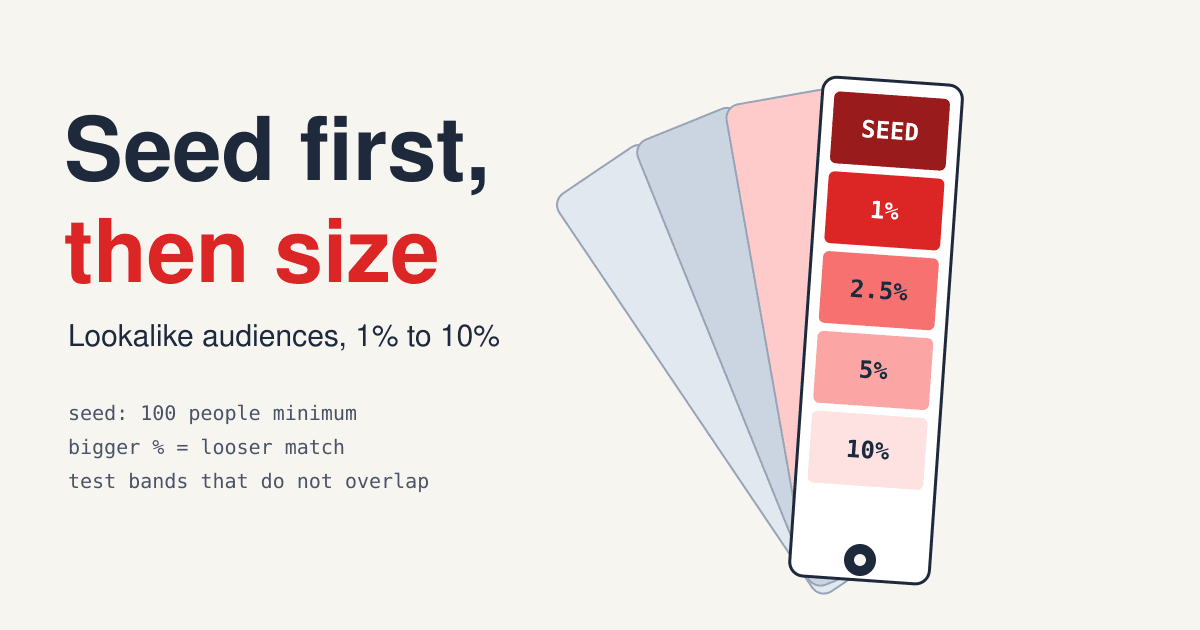
Build the seed from the action you want more of, usually recent buyers or your best customers, cleaned of refunds, staff and test orders. Start narrow (1% on Meta, narrow on Google) and widen only when the narrow audience runs out of people to show ads to at a cost you accept. Test sizes as separate bands that do not overlap, or the wide audience will quietly re-buy the narrow one.
- 100people: the smallest seed Meta's API and Google's targeting-constraint mode accept
- 1% / 5%Meta's two preset types: Similarity and Greater Reach
- 2.5 / 5 / 10%Google's narrow, balanced and broad settings
What goes into the seed list
A lookalike model looks for people who share traits with the seed. Google's help page puts the choice in plain terms: upload a list of the customers who bought specific products, and it looks for people most similar to them. Its 2026 note on lookalikes in Demand Gen campaigns goes further and recommends high-intent seed lists, such as recent converters and people who engaged with your brand. A list of everyone who ever touched the brand teaches the model an average, and the average customer is not the one you want more of.
The grades below are our editorial reading of that advice, not a platform ranking.
-
Strong seed
Buyers from the last few months
People who completed the action you pay for, recently enough that the product and price they saw match today. Recency keeps last year's customers, bought on a different offer, out of the model.
-
Strong seed
Your highest-value customers
Repeat buyers or the top slice by order value. The list is smaller, so check it still clears the platform minimum after matching.
-
Usable seed
All customers ever
Large and real, but it mixes one-time coupon buyers with loyal ones. Use it when the recent list is too small to build from.
-
Usable seed
Newsletter subscribers or leads
Fine when a sign-up is the goal. When the goal is a sale, the model learns what a subscriber looks like, not a buyer.
-
Weak seed
All site visitors
Includes people who bounced in two seconds, people who came for a job ad and your own team. Narrow it to one page or one action, which Google's page also allows: visits to a specific page or views of a video.
-
Weak seed
Followers, fans and engagers
Meta still accepts Page fans as a seed. A like is cheap, so the model learns who likes things, which can be far from who pays.
Clean the list before you upload it
- Remove refunded and cancelled orders, staff accounts, test orders and resellers.
- Remove duplicates, so one person with three orders counts once.
- Keep one country per seed where you can: the model compares the seed with people in the place you deliver.
- Check the matched count, not the rows you uploaded. Google's floor is "over 100 active matched people" summed across the seed lists, and a list loses rows that the platform cannot match to an account.
- Keep a copy of the seed as an exclusion audience. The pages read for this post do not say whether a lookalike leaves your existing customers out, so exclude them yourself if you are buying new customers.
The percentage is a size, and each platform draws it differently
Meta's Marketing API documentation describes its two preset types in one line each. Similarity is "the top 1% of people in a selected country who are most similar to the seed", with smaller reach and a more precise match. Greater Reach is the top 5%, "with a less precise match". Instead of a type you can set a ratio yourself, from 1% to 20% in steps of 1%. Google's Demand Gen lookalikes come in three sizes, each a share of users in the ad's target location: narrow 2.5%, balanced 5% and broad 10%, where broad gives the most reach and may include people who are less similar.
-
1%Meta, Similarity
The closest match the platforms offer.
-
2.5%Google, narrow
Google's tightest setting.
-
5%Meta, Greater Reach / Google, balanced
The same share on both platforms, reached by different models.
-
10%Google, broad
The largest Google setting.
-
20%Meta, custom ratio ceiling
The widest ratio the Meta API accepts.
Bars are drawn against a 20% scale. Each figure is a share of users in the delivery location, not a match score.
Google changed what "narrow" means in 2026. Google says it is moving Demand Gen lookalikes to a suggestion mode in phases through 2026, available from March 2026. In that mode the narrow, balanced and broad slider "will no longer function as a targeting constraint": the seed and the reach level become signals, and the system may reach users outside the 2.5%, 5% or 10% thresholds to hit a conversion or cost-per-action goal. The 100-person minimum no longer applies in that mode either. Advertisers who want the old behaviour can opt out through a form Google links on the page, with UI controls promised later in the year. The change covers Demand Gen only, not Video campaigns or Display & Video 360. Check which mode your ad group is in before you read a narrow lookalike's results as narrow.
Worked numbers: how far one seed is stretched
The trade-off is easiest to see as arithmetic. The example below assumes a market where the platform counts 20 million users and a seed of 1,000 matched buyers. Both numbers are made up for the example; the percentages are the platform settings above.
| Setting | People in the audience | People per seed member |
|---|---|---|
| 1% (Meta Similarity) | 200,000 | 200 |
| 2.5% (Google narrow) | 500,000 | 500 |
| 5% (Meta Greater Reach, Google balanced) | 1,000,000 | 1,000 |
| 10% (Google broad) | 2,000,000 | 2,000 |
| 20% (Meta ratio ceiling) | 4,000,000 | 4,000 |
Audience = 20,000,000 x the percentage. People per seed member = audience / 1,000.
Two readings follow. First, even the narrowest setting asks the model to find 200 strangers for every buyer it was shown, so a seed of 1,000 people with mixed motives gives it very little to go on; a cleaner seed helps more than a bigger percentage. Second, the market size changes everything: the same 1% is a much smaller audience in a small country, and there a narrow lookalike can run out of fresh people quickly. When frequency climbs and cost per result rises in the narrow audience, that is the signal to widen, not the calendar. The reach and frequency post covers how to read that climb.
Test sizes in bands that do not overlap
A 5% lookalike contains the 1% one. Run both at once and the two ad sets bid for the same closest people, and the wider one's results borrow from the narrow one's best users. Meta's API lets you cut the audience into slices instead: with starting_ratio 0.01 and ratio 0.02 you get only the people between the 1% and 2% marks. Three slices make a clean test:
-
Band A: the closest
starting_ratio 0.00ratio 0.01The top 1%. Your benchmark for cost per result.
-
Band B: the next ring
starting_ratio 0.01ratio 0.03People from the 1% to the 3% mark, none of them in band A.
-
Band C: the outer ring
starting_ratio 0.03ratio 0.06People from 3% to 6%. If this band costs about what band A costs, the seed generalises well and wider audiences are worth buying.
- Same everything else. One creative, one budget per band, one optimisation goal, so the band is the only thing that differs.
- Read cost per result and the result itself. Wider bands often buy cheaper clicks and fewer buyers; judge them on the action you pay for.
- Let the audiences fill first. Meta says a lookalike takes 1 to 6 hours to populate and refreshes every 3 days while it belongs to an ad set; Google says a new lookalike takes about 72 hours to populate and refreshes every 1 to 2 days.
- Check where it delivers. From Marketing API v27.0, Meta no longer takes a country in the lookalike itself; it delivers to the locations set in the ad set, so the ad set decides which country the percentage is taken from.
- Count what the band caused. A cheap band may be finding people who would have bought anyway. A holdout, as in the incrementality testing post, answers that; the attribution window post explains why platform-reported conversions run high.
Google's three settings cannot be sliced this way, so on Google compare narrow and broad in separate ad groups and expect some overlap, or keep the constraint mode on while you test.
Questions buyers ask
How big should the seed list be?
Big enough to clear the minimum after matching (100 people on Meta, over 100 active matched people on Google in constraint mode), and made of the right people. Neither platform page read for this post names an ideal size, so pick the list by the action it records first and by its size second.
Should I start at 1% or 10%?
Start at the closest setting and widen when it runs out of fresh people at an acceptable cost. A wider audience is not a better audience; it is a bigger one with a looser match.
Can I combine several lists into one seed?
Google allows up to 10 seed lists in one lookalike segment and counts the matched people across all of them. Combine lists that record the same kind of customer; mixing buyers with casual visitors blurs what the model learns.
Can a customer list from a mobile app be a seed on Google?
Not a Mobile Device ID customer list: Google's requirements exclude it. App activity can still feed a seed through Google's app audience lists.
Why does my narrow Google lookalike reach more people than 2.5%?
Probably because the ad group is in the 2026 suggestion mode, where the reach level is a signal, not a limit. The opt-out form on Google's page restores the threshold behaviour.
Sources and what they are
- Meta for Developers, Marketing API: Lookalike Audiences (platform documentation: the 100-person seed, the Similarity 1% and Greater Reach 5% types, ratios from 1% to 20%, starting_ratio bands, 1 to 6 hours to populate, a refresh every 3 days, delivery to ad set locations from v27.0)
- Google Ads Help, Use Lookalike segments in Demand Gen campaigns as a Targeting Constraint (platform help: seed sources, narrow 2.5%, balanced 5%, broad 10%, the over-100 matched-people requirement, the Mobile Device ID exclusion, up to 10 seed lists, refresh every 1 to 2 days)
- Google Ads Help, Use Lookalike segments to grow your audience (platform help: the 2026 suggestion mode, the opt-out, the 72-hour population time and the high-intent seed advice)
All pages were read on 2026-11-12 and checked again for publication on 2026-11-13. The 20 million market and the 1,000-person seed in the worked table are examples, not data. The seed grades are editorial. Meta's Business Help Center pages did not load for this post, so every Meta figure comes from its developer documentation, which describes the API; the ads manager screens may offer a narrower range of percentages.