SEO for a new website: the first 90 days, by the book
A 90-day plan for a newly launched site, limited to what Google documents and labelled wherever it is our judgement instead. For founders who want to be found and do not want to chase folklore.
By the MEDIAPRONET Editorial Team. Published , revised . 22 minute read, 16 sources.
The short answer
What SEO should a brand-new website do in its first 90 days?
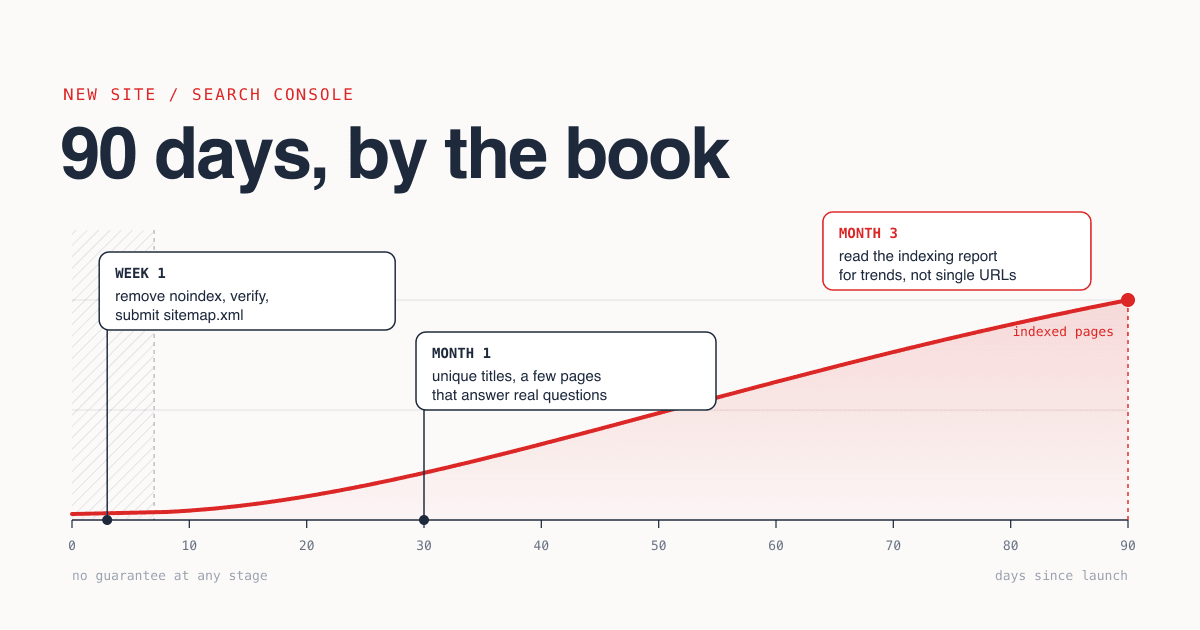
Make the site crawlable, understandable and worth indexing, then wait. In week 1, remove any leftover noindex or robots.txt block, verify the site in Search Console and submit a sitemap. In month 1, give every page a unique title and description and publish a few pages that answer real questions. By month 3, read the Page indexing report for trends, not single URLs. Google guarantees none of it[2].
- Time needed
- About 3 hours in week 1
- Cost
- Free (Search Console, IndexNow)
- Skill level
- Can edit HTML head and DNS
- Best for
- Sites under 90 days old
What you will leave with
- Google says it can take "a week or so" to start crawling and indexing a new page or site, and it does not guarantee crawling, indexing or serving at all[4][2].
- A robots.txt block and a
noindexrule do different jobs, and combining them can keep a page you wanted removed in the index[8]. - There is no documented character limit for titles or meta descriptions, and no preferred word count. Google says so directly[9][10][12].
- "Not indexed" in Search Console is, in Google's words, "not necessarily bad". Redirects, alternates and duplicates are supposed to be there[4].
- Requesting indexing repeatedly for the same URL does not get it crawled faster[3].
- IndexNow notifies Bing and five other engines of changes in one request. Google is not on the participant list[15].
How does Google find and index a brand-new website?
Google crawls, indexes and serves pages in three separate stages, mostly discovers new pages through links from pages it already knows, and promises nothing at any stage[2][1].
Google's own description is blunt: Search "works in three stages, and not all pages make it through each stage"[2]. There is no central registry of web pages to sign up to, and Google states it "doesn't accept payment to crawl a site more frequently, or rank it higher"[2].
For a new site this sets the job. You cannot push a page into the index. You can remove the things that stop a crawler, make each page easy to understand, and give Google a reason to keep it. Everything in this guide is one of those three.
- for Google to start crawling and indexing a new page or site[4]
- A week or so
- that indexing can take after you request it in URL Inspection[5]
- Up to a week or two
- URLs allowed in a single sitemap file (or 50MB uncompressed)[14]
- 50,000
- of robots.txt requests returned a valid 200 status in the 2025 Web Almanac crawl[16]
- 85%
The vocabulary Search Console assumes you know
- Crawling
- Google downloading a page with automated programs called crawlers[2].
- Indexing
- Google analysing the text, images and video on a crawled page and deciding whether to store it. Indexing depends on the content of the page and its metadata[2].
- Serving
- Returning a stored page for a query. A page can be indexed and still not shown, for example when it is not relevant to what people search[2].
- Canonical
- The one URL Google picks to represent a group of pages with similar content. It is the version that may be shown in results[2].
- Sitemap
- A file listing the URLs you want crawled. Google calls submitting one "merely a hint"[14].
- noindex
- A rule in a meta tag or HTTP header that makes Google drop a page from results entirely[8].
On discovery, the SEO Starter Guide says Google primarily finds pages through links from other pages it has already crawled[1]. That is the one sentence this guide spends on links. Where to announce a product is a separate question, covered in where to promote your startup.
How long does it take a new site to show up on Google?
Google documents days to weeks for crawling and indexing, and hours to several months for a change to be reflected. It publishes no figure for how long ranking takes.
Figure 1Every waiting time Google states in the pages we checked
| What you are waiting for | What Google says | Where |
|---|---|---|
| A new site to start being crawled and indexed | What Google says"It can take a week or so" | WherePage indexing report help[4] |
| A crawl after you ask for one | What Google says"Anywhere from a few days to a few weeks" | WhereAsk Google to recrawl[3] |
| Indexing after Request indexing | What Google says"Can take up to a week or two", though it "typically takes only a day or so" | WhereURL Inspection help[5] |
| Validation of a fix in Search Console | What Google says"Typically takes up to about two weeks, but in some cases can take much longer" | WherePage indexing report help[4] |
| A change to be reflected in Search | What Google says"A few hours" to "several months" | WhereSEO Starter Guide[1] |
Notice what is missing. None of these pages gives a time to rank, a "sandbox" period for new domains, or a number of days after which a site is trusted. If you read a precise figure for any of those, it did not come from the documentation we checked.
The 90-day frame in this guide is ours, not Google's. It is long enough for several crawl and validation cycles to complete, and for the Starter Guide's advice to "wait a few weeks" before judging a change to apply more than once[1].
How do you set up Search Console and submit a sitemap?
Verify the site as a Search Console property, publish a sitemap of absolute URLs at the site root, submit it in the Sitemaps report, and inspect the homepage once. It is free and takes under an hour.
How to set up Search Console and a sitemap for a new site
Add a property and verify ownership15 min
Search Console offers two website property types. A Domain property (
example.com) covers every subdomain and both http and https, and can only be verified with a DNS record at your domain provider. A URL-prefix property (https://example.com/) covers only URLs under that exact prefix and protocol, and can be verified several ways, including an HTML file upload, an HTML tag on the homepage, or an existing Google Analytics or Tag Manager snippet[6][7]. If you can edit DNS, the Domain property saves adding the www and non-www versions separately. Leave the token in place afterwards: verification lasts only as long as Search Console can still find it[7].Generate the sitemap15 min
List only the pages you want in search results, using fully-qualified absolute URLs. One file holds up to 50,000 URLs or 50MB uncompressed. Skip
<priority>and<changefreq>: Google ignores both. Set<lastmod>only if it is accurate, because Google uses it when it is consistently and verifiably so[14].Publish it at the site root5 min
Google recommends the root, because a sitemap there can affect every file on the site. Then add one line to robots.txt:
Sitemap: https://example.com/sitemap.xml[14].Submit it in the Sitemaps report5 min
The report shows when Googlebot fetched the file and any processing errors. Submitting is "merely a hint" and does not guarantee Google will download or use the file[14].
Inspect the homepage and run a live test10 min
Paste the homepage URL into URL Inspection. The default result describes the most recently indexed version, not the live page, so run the live test to see what Google can fetch now. Then use Request indexing once. Google says indexing after a request "typically takes only a day or so, but can take much longer in some cases"[5].
Confirm after a few days2 min
Search
site:example.comwith your own domain. The Starter Guide's test is simple: if you see results pointing to your site, you are in the index[1].
URL Inspection has limits worth knowing before you lean on it. The live test "does not test for all possible indexing issues", there is "a daily limit to how many index requests you can submit", and a request "does not guarantee that the page will appear in the Google Index"[5]. Use it for the homepage and a handful of key pages. For everything else, the sitemap is the documented route[3].
IndexNow covers the engines Search Console does not. It is a protocol for telling search engines a URL was added, updated or deleted. The participating endpoints listed in the indexnow.org FAQ are Amazon, Bing, Naver, Seznam.cz, Yandex and Yep, and a submission to one is shared with the rest[15]. Google is not on that list.
IndexNow in four facts
- You prove ownership with a key of 8 to 128 characters, hosted as a
.txtfile named after the key[15]. - One POST request can carry up to 10,000 URLs[15].
- Submit when content is added, updated or deleted. The FAQ says to avoid submitting the same URL many times a day without meaningful changes, and to wait at least 5 minutes before resubmitting[15].
- It does not guarantee indexing, and it does not replace a sitemap: the FAQ recommends an XML sitemap for ongoing discovery[15].
What stops a newly launched site from being indexed?
Usually a rule you wrote yourself before launch: a robots.txt disallow, a noindex tag, or a canonical that points somewhere else. Check those three before suspecting anything subtle.
Pre-launch sites are often deliberately hidden, and the hiding survives the launch. That is our observation, not a Google statistic, but the fix is documented precisely, because the two common tools behave differently.
robots.txt disallow
noindex rule
- Controls indexing. Google drops the page from results entirely, regardless of whether other sites link to it[8].
- Two forms:
<meta name="robots" content="noindex">in the page, or anX-Robots-Tag: noindexresponse header[8]. - Only works if the page is crawlable. It "must not" be blocked by robots.txt, or Google never sees the rule[8].
The call: To launch: remove both. To keep a page out of Google later: use noindex and leave the page crawlable.
Canonicals are the third way to hide a page. Google treats a redirect and a rel="canonical" link as strong signals and sitemap inclusion as a weak one, and the methods stack[11]. So a template that puts the homepage URL in every page's canonical is a strong, site-wide request to index one page.
The documented hygiene is short: use absolute paths in rel="canonical", do not declare different canonicals through different methods, and link internally to the version you consider canonical[11].
Figure 2How many pages have each basic element in place (mobile, 2025)
Title tag
98.54%H1 heading
70%Meta description
67.2%Canonical tag
67%
How do you read the Page indexing report without panicking?
Read the reason, not the count. The report has two statuses, Indexed and Not indexed, and Google states that "Not indexed is not necessarily bad"[4].
Google's help page tells you what healthy looks like: "a gradually increasing count of indexed pages as your site grows". It also tells you what not to expect: "You should not expect all URLs on your site to be indexed, only the canonical pages"[4]. A new site with 12 indexed pages and 30 not indexed can be exactly right.
Figure 3Page indexing reasons a new site is most likely to see
| Reason, as Google names it | What it means | What to do |
|---|---|---|
| Discovered - currently not indexed | What it meansGoogle found the URL but has not crawled it yet. | What to doWait. Confirm the URL is in the sitemap and linked from another page. |
| Crawled - currently not indexed | What it meansGoogle crawled the page and did not index it. It may or may not be indexed in the future. | What to doNo technical fix is documented, and resubmitting is not needed. Ask whether the page adds anything (our judgement). |
| URL marked 'noindex' | What it meansGoogle met a noindex rule and obeyed it. | What to doIf you want the page indexed, remove the rule from the tag or header. |
| URL blocked by robots.txt | What it meansThe site's robots.txt blocked the crawl. | What to doRemove the disallow for pages you want crawled. |
| Page with redirect | What it meansA non-canonical URL that redirects to another page. | What to doNothing, if the redirect is intended. |
| Alternate page with proper canonical tag | What it meansThe page points to a canonical that is indexed. | What to doNothing. Google says there is nothing you need to do. |
| Duplicate without user-selected canonical | What it meansA duplicate of another page with no canonical declared. | What to doDeclare the canonical you prefer. |
| Duplicate, Google chose different canonical than user | What it meansGoogle thinks another URL is the better canonical than the one you marked. | What to doInspect the URL to see which one it chose, then align redirects, canonical tags and internal links. |
| Soft 404 | What it meansThe response looks like a "not found" page to Google. | What to doReturn a real 404 for missing pages, or give the page real content. |
| Not found (404) | What it meansThe URL returned a 404. | What to doOften nothing: 404s "are not necessarily a problem" when a page was removed without a replacement. |
| Server error (5xx) | What it meansThe server returned a 500-level error when requested. | What to doFix the server error, then validate the fix. |
A page is not indexed: what to check, in order
If It has been live for less than a week
Wait. Google says a new page or site can take a week or so to start being crawled and indexed[4].
If The live test cannot fetch it
Fix the response first: a 5xx, a 404 or a redirect loop comes before everything else.
If The reason is "URL blocked by robots.txt"
Remove the disallow, then inspect the URL again.
If The reason is "URL marked 'noindex'"
Remove the meta tag or the
X-Robots-Tagheader, and confirm in URL Inspection that Googlebot no longer receives it[8].If The reason mentions duplicate or canonical
Compare the canonical you declared with the one Google selected, and make redirects, tags, sitemap and internal links agree[11].
If The reason is "Discovered - currently not indexed"
Check the sitemap and internal links, request indexing once, and stop. Repeat requests do not speed up the crawl[3].
If The reason is "Crawled - currently not indexed"
Nothing is technically broken. Improve the page or accept that it is not one Google wants to keep.
If It is indexed but gets no impressions
This is a relevance and quality question, not an indexing one[2].
What should titles, descriptions and first pages look like?
Give every page a unique, descriptive, concise title and its own description, then publish a few pages that answer a real question better than what already exists. Google documents no length limit for either tag.
Google builds the title link from several sources, including the <title> element, the main visual title, headings and og:title[9]. Its advice is to give every page a <title>, keep it descriptive and concise, avoid keyword stuffing, avoid boilerplate shared across pages, and consider branding it with just the site name at the beginning or end[9].
Snippets are "primarily created from the page content itself", and Google only sometimes uses the meta description, when it describes the page more accurately[10]. So the description is worth writing once per page, and not worth agonising over.
Title and meta description template
One per page. Acme Labels is a made-up product, not a real one.
<title>[What the page is, in plain words] - [Site name]</title>
<meta name="description" content="[What it does or answers]. [Who it is for]. [One concrete detail: a feature, a number, a limit].">

Example (invented product):
<title>Shipping label software for small shops - Acme Labels</title>
<meta name="description" content="Acme Labels prints carrier labels from your order list in one click. Built for shops sending under 500 parcels a month. Works with CSV exports and has no monthly minimum.">

Check before you ship:
- Is this title different from every other title on the site?
- Would it still make sense if the site name were cut off?
- Does the description say something the title does not?
Google's people-first questions worth asking of every page
- Does the content provide original information, reporting, research, or analysis?[12]
- Does it provide substantial value when compared to other pages in search results?[12]
- Is it written or reviewed by someone who demonstrably knows the topic well?[12]
- Will someone reading it leave feeling like they've had a satisfying experience?[12]
- Does your site have a primary purpose or focus?[12]
For a new product, the pages that pass those questions are usually the ones only you can write: how the product works, what it costs, what it does not do, and honest answers to the questions prospects already send you. A workable rule of thumb is three to five of those in the first month, each built around one question.
Which SEO advice can a new site safely ignore?
Anything on the list Google itself publishes under "things we believe you shouldn't focus on", plus a few habits its other pages rule out by name.
Figure 4Common myth versus what Google documents
| Common myth | Google says |
|---|---|
| You need the keywords meta tag. | Google says"Google Search doesn't use the keywords meta tag."[1] |
| Longer content ranks better; aim for a word count. | Google says"The length of the content alone doesn't matter for ranking purposes."[1] Asked whether it has a preferred word count, Google answers "No, we don't."[12] |
| Keywords in the domain name are a big win. | Google saysKeywords in the domain or URL path "alone have hardly any effect"[1]. |
| Duplicate content gets you penalised. | Google says"It's inefficient, but it's not something that will cause a manual action."[1] |
| You need exactly one H1 and headings in strict order. | Google saysFor Search, it "doesn't matter if you're using them out of order", and there is "no magical, ideal amount of headings"[1]. |
| E-E-A-T is a ranking factor to optimise. | Google says"No, it's not."[1] |
| Set sitemap priority and changefreq carefully. | Google says"Google ignores <priority> and <changefreq> values."[14] |
| Request indexing every day until the page is in. | Google saysRequesting a recrawl multiple times for the same URL "won't get it crawled any faster"[3]. |
| Publish constantly, or refresh dates, so the site looks fresh. | Google saysOn adding or removing content to seem "fresh", Google's answer is "No, it won't". It also lists changing dates without substantial changes as a warning sign[12]. |
Figure 5Where 90 days of effort goes (editorial judgement)
High impact Likely impact for a new site, Low effort Effort
Do in week 1Start here
Remove launch blocks, verify Search Console, submit a sitemap, unique titles and descriptions, consistent canonicals.
High impact Likely impact for a new site, High effort Effort
Do across the 90 days
A few pages that answer real questions from first-hand knowledge. Slow to write, and the only part that compounds.
Low impact Likely impact for a new site, Low effort Effort
Skip
Keywords meta tag, sitemap priority values, daily indexing requests, heading-count rules.
Low impact Likely impact for a new site, High effort Effort
Avoid
Word-count targets, publishing many pages on many topics, date refreshing, chasing a score in an SEO tool.
What should a new site never do to speed things up?
Anything in Google's spam policies. Sites that violate them "may rank lower in results or not appear in results at all"[13].
The pressure to shortcut is highest in exactly these 90 days, when the reports are empty. Google says it detects violations with automated systems and, as needed, human review that can result in a manual action[13]. The policies most relevant to a new site are described here factually, as things to recognise and decline.
Named in the spam policies
- Avoid: Scaled content abuse Generating many pages for the primary purpose of manipulating search rankings. The examples include using generative AI or similar tools to produce many pages without adding value for users, and stitching together content from other pages without adding value[13].
- Avoid: Doorway abuse Sites or pages created to rank for specific, similar search queries, which lead users to intermediate pages that are less useful than the final destination[13].
- Avoid: Keyword stuffing Filling a web page with keywords or numbers in an attempt to manipulate rankings[13].
- Avoid: Link spam Creating links to or from a site primarily for the purpose of manipulating search rankings[13].
- Avoid: Expired domain abuse Buying an expired domain and repurposing it primarily to manipulate search rankings[13].
- Avoid: Hidden text and cloaking Placing content on a page in a way solely to manipulate search engines and not to be easily seen by visitors, or presenting different content to users and to search engines with the intent to manipulate rankings[13].
- Avoid: Scraping Taking content from other sites, often through automated means, and hosting it with the purpose of manipulating search rankings[13].
One more thing not to do: buy certainty. Google does not accept payment to crawl or rank[2], so nobody else can sell it. That applies to directories too. MEDIAPRONET is a place where people browse products, and its pricing page says plainly that it does not sell search rankings. A listing is a public profile, not an indexing service.
What should you do in week 1, month 1 and month 3?
Week 1 is plumbing, month 1 is pages, month 3 is reading the data and fixing what it shows. The schedule is our method; the waiting times inside it are Google's.
The first 90 days
Day 1
Unhide the site
Remove pre-launch
noindexrules and robots.txt disallows. Check both the HTML and the response headers[8].Days 1-3
Days 3-7
Week 2
First look, no action
Expect little. A week or so is the documented time to start crawling and indexing[4]. Fix only hard errors.
Weeks 2-4
Publish the pages only you can write
Three to five pages, one question each, written from first-hand knowledge. Notify IndexNow when each goes live.
Weeks 5-8
Read reasons, fix causes
Open the Page indexing report weekly. Fix a cause once, then validate; validation typically takes up to about two weeks[4].
Weeks 9-13
Judge the trend
Is the indexed count rising as the site grows? Which queries show impressions? Improve the pages that already earn them before writing new ones.
First 90 days: the working checklist
0 of 18 done
Week 1
Month 1
Month 3
Search is the slow channel. While it catches up, people still need a way to find the product, and that is distribution work, not SEO: see where to promote your startup and the audited list of startup directories. If a directory profile is part of that plan, you can browse MEDIAPRONET to see what a listing looks like before deciding.
6 quick answers
Common questions
Short answers to the follow-up questions readers ask most.
Not here? Ask usNo. Google's SEO Starter Guide says the vast majority of sites in its results are found and added automatically as it crawls the web. Verifying the site in Search Console and submitting a sitemap is still worth doing, because it gives Google a list of the URLs you care about and gives you the reports that explain what happened to each one. Neither step guarantees indexing.
Sources
- [1]Search Engine Optimization (SEO) Starter GuideGoogle Search Central, 2025
- [2]In-depth guide to how Google Search worksGoogle Search Central, 2025
- [3]Ask Google to recrawl your URLsGoogle Search Central, 2025
- [4]Page indexing reportGoogle Search Console Help
- [5]URL Inspection toolGoogle Search Console Help
- [6]Add a website or platform property to Search ConsoleGoogle Search Console Help
- [7]Verify your site ownershipGoogle Search Console Help
- [8]Block Search indexing with noindexGoogle Search Central, 2025
- [9]Influencing your title links in search resultsGoogle Search Central, 2025
- [10]Control your snippets in search resultsGoogle Search Central, 2026
- [11]How to specify a canonical URL with rel="canonical" and other methodsGoogle Search Central, 2026
- [12]Creating helpful, reliable, people-first contentGoogle Search Central, 2026
- [13]Spam policies for Google web searchGoogle Search Central, 2026
- [14]Build and submit a sitemapGoogle Search Central, 2026
- [15]IndexNow FAQIndexNow.org
- [16]Web Almanac 2025: SEOHTTP Archive, 2026
How this guide was put together. Every rule, waiting time and quoted phrase on this page was checked against the cited Google Search Central, Search Console Help and indexnow.org pages on 11 October 2026, and the adoption figures come from the HTTP Archive Web Almanac 2025 SEO chapter (published January 2026). The meanings in the Page indexing table are condensed from Google's descriptions, not quoted. Documentation shows what Google says it does, not how any individual site will perform, and the Almanac figures show how common an element is, not whether it helps. The 90-day schedule, the effort and impact matrix, the checklist and the page-count rule of thumb are editorial judgement.