A product tagline and description formula for launch day
Every launch venue asks for the same three pieces of copy at different lengths. This is a working method for founders who need to write them once, fit them to each field, and check that strangers understand them.
By the MEDIAPRONET Editorial Team. Published , revised . 17 minute read, 16 sources.
The short answer
How do you write a product tagline and description for a launch?
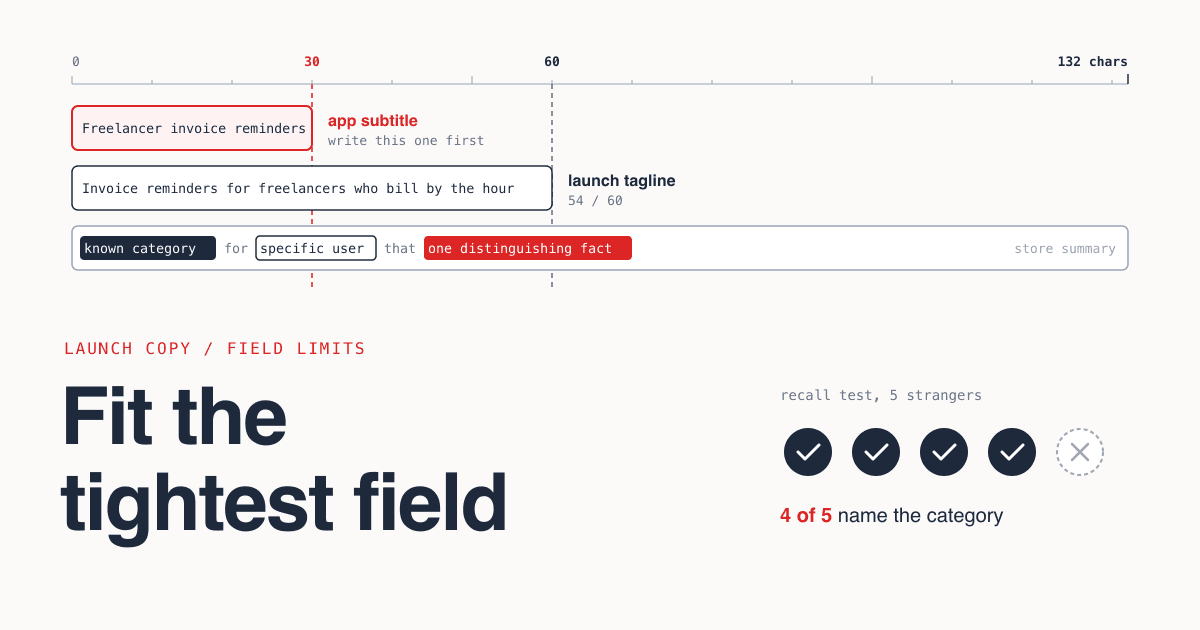
Write the tagline as a classification, not a slogan: a category the reader already knows, who it is for, and the one thing that sets it apart. Draft it to fit the tightest field you will face (30 characters for an Apple App Store subtitle, 60 for a Product Hunt tagline), then expand it into a two-sentence description and a longer one that leads with the same sentence.
- Time needed
- About 30 minutes
- Cost
- Free
- Tightest field
- 30 characters
- Test group
- 5 people
What you will leave with
- A tagline has one job: let a stranger file your product in the right mental drawer in a single read. Persuasion comes later, in the description.
- The documented one-line limits run from 30 characters (Apple subtitle) to 132 (Chrome Web Store summary), so write the 30-character version first and expand from it[8][6].
- In a 1997 measurement study by John Morkes and Jakob Nielsen with 51 users, a concise, scannable and objective rewrite of a website scored 124% higher in measured usability than the promotional original[14].
- Product Hunt, Apple and the Chrome Web Store all tell makers in writing to avoid hype, generic claims or superlatives in these fields[1][8][6].
- A five-person recall test tells you in ten minutes whether the tagline classifies. If fewer than four people can name the category, rewrite it.
What is a product tagline actually for?
A tagline tells a stranger what kind of thing your product is, so they can decide in one read whether it is relevant to them. It is a label on a drawer, not an advert.
On a launch page your product sits in a list of other products. Each visitor gives each row a glance, and the only text in that glance is a name they have never heard and the line beside it. If the line does not say what the thing is, the visitor cannot tell whether to care, and moves on.
That is why slogans fail in tagline fields. A slogan assumes the reader already knows the product. At launch nobody does.
- of test users always scanned any new page they came across (1997 study)[13]
- 79%
- read word-by-word in the same 1997 study[13]
- 16%
- of the text on an average web page is what users realistically read, and 28% at most (2008 analysis)[15]
- 20%
- higher measured usability for a concise, scannable, objective rewrite vs promotional copy (1997, 51 users)[14]
- 124%
Four terms that get mixed up
- Tagline
- One line that classifies the product: what it is, for whom, and what is distinct about it. Written for people who have never heard of you.
- Slogan
- A memorable phrase tied to a brand people already recognise. It expresses attitude, not category. Useful years later, useless in a launch field.
- Value proposition
- The reason to choose you over the alternative, stated as a benefit with its proof. Product Hunt puts this in the description field, not the tagline[1].
- Positioning
- The internal decision about which category you compete in and against what. It is not copy. The tagline is the shortest public expression of it.
How long can a tagline and description be on each venue?
The one-line field ranges from 30 characters on the Apple App Store to 132 on the Chrome Web Store, and Product Hunt allows 60. Long descriptions are capped at 4,000 characters on both app stores, and Product Hunt's own pages give two different figures, 500 and 260.
Figure 1Documented copy fields and wording rules by launch venue (checked October 2026)
| Venue | Name or title | One-line field | Longer text | Documented wording rule |
|---|---|---|---|---|
| Product Hunt[1][2] | Name or titleOnly the product's name, no description | One-line fieldTagline, max 60 characters | Longer textDescription: "max 500 characters" in the launch guide, "within 260 characters" in the help centre (May 2025) | Documented wording rule"no gimmicks or over-the-top language" |
| Hacker News, Show HN[3][4] | Name or titleTitle must begin with "Show HN" | One-line fieldNone: the title is the one line | Longer textNot specified on the pages checked | Documented wording ruleNo uppercase or exclamation points to make a title stand out. Neither page states a length limit. The Launch HN instructions for YC startups cap the title at 80 characters[5]. |
| Chrome Web Store[6][7] | Name or titleExtension name, maximum of 75 characters | One-line fieldSummary, 132 characters or less | Longer textDescription: no limit stated on the page checked. Ideal format is an overview paragraph, then a short list of main features. | Documented wording ruleIn the summary: no generic descriptions like "best extension ever", no superlatives, no references to similar or competing extensions |
| Apple App Store[8][9] | Name or titleApp name, up to 30 characters | One-line fieldSubtitle, up to 30 characters. Promotional text, up to 170. | Longer textDescription, limited to 4000 characters | Documented wording ruleAvoid generic subtitles such as "world's best app". The first sentence of the description is what users read without tapping to read more. |
| Google Play[10] | Name or titleApp name, 30 character limit | One-line fieldShort description, 80 character limit | Longer textFull description, 4000 character limit | Documented wording ruleRepetitive or irrelevant use of keywords can result in an app being suspended |
| Google Search[11][12] | Name or titleTitle element: no limit, truncated as needed | One-line fieldMeta description: no limit, snippet truncated as needed | Longer textNot applicable | Documented wording ruleAvoid keyword stuffing and boilerplate. Google may build the title link and snippet from other page content. |
| MEDIAPRONET submit form | Name or titleName, 3 to 60 characters | One-line fieldTagline, max 100 characters | Longer textDescription, 100 to 5,000 characters | Documented wording ruleOne category, up to 5 tags |
Figure 2Documented maximum length of the one-line field
Apple App Store subtitle
30 charsProduct Hunt tagline
60 charsGoogle Play short description
80 charsChrome Web Store summary
132 chars
How much of your listing will people actually read?
Very little. Usability research published in 1997 and an analysis from 2008 found that most people scan, and that plain factual copy scored measurably higher than promotional copy.
The numbers are old, but the methods are published. In 1997 Jakob Nielsen reported that 79 percent of test users always scanned any new page, and only 16 percent read word-by-word[13]. In 2008 he analysed 45,237 page views recorded from 25 users in an academic browsing study and concluded that people have time to read at most 28% of the words on an average page, with 20% more likely[15].
The 2008 data came from highly literate users browsing normally, not from a launch page, so treat it as direction, not a forecast. In the 1997 measurement study, 51 users tried five versions of one website, and the scores below are relative to the promotional version. Among the conclusions John Morkes and Jakob Nielsen drew from their earlier studies: users "detest anything that seems like marketing fluff or overly hyped language", which they call marketese, "and prefer factual information"[14].
Figure 3Measured usability gain over a promotional control version (1997, 51 users)
Objective language
27%Scannable layout
47%Concise text
58%All three combined
124%
What this means for three fields
- Tagline Assume it is the only thing read. It must work with no logo, no screenshot and no second sentence.
- Short description Assume the first sentence is read and the second is skimmed. Apple says the same of its own store: the first sentence is what users can read without tapping to read more[8].
- Long description Assume it is scanned for one specific answer. US federal plain language guidance says to express only one idea in each sentence and to limit each paragraph to one topic[16].
What is a reliable formula for a product tagline?
Category the reader already knows, plus who it is for, plus the one distinguishing fact. If you have room for only one of the three, keep the category.
Tagline formula
Fill all three slots, then delete from the right until it fits the field.
[Known category] for [specific user] [that / with / who] [one distinguishing fact]

60 characters: Invoice reminders for freelancers who bill by the hour
30 characters: Freelancer invoice reminders

Check: could a stranger say what shelf this sits on? If not, the category slot is still empty.
The formula is our method, not a finding. It works because each slot answers a question the reader is silently asking: what is this, is it for me, why this one. The examples below are invented products, written to show the formula failing and working.
Weak: slogans (invented examples)
- "Supercharge your workflow with the power of AI" - no category, no user. It could describe ten thousand products.
- "The future of invoicing is here" - names a category, then spends the rest on a claim nobody can check.
- "Simple. Fast. Secure." - three adjectives every competitor also claims.
- "Database tooling, reimagined" - the reader still has to guess which tool.
Strong: classifications (invented examples)
- "AI meeting notes that file action items in your tracker" - category, then the distinguishing job.
- "Invoice reminders for freelancers who bill by the hour" - category, user, and a qualifier that excludes the wrong reader.
- "Self-hosted password manager for teams under 20 people" - two hard facts replace three adjectives.
- "Open-source Postgres backup CLI with one-command restore" - a developer knows in one read whether to click.
The call: Every strong line is 54 to 56 characters, inside Product Hunt's 60-character tagline limit[1]. None of them is clever. All of them can be filed.
Which formula for which kind of product
If Your category is well known and crowded
Use the full formula and spend most characters on the distinguishing fact: a constraint, an audience, a deployment model.
If Your category has no agreed name yet
Lead with a verb and an object instead: "Turn bank statements into categorized expenses". The reader files it by the task.
If You are launching a developer tool
Name the artifact and the technology: CLI, SDK, library, extension, plus the language or database. Developers classify by stack before benefit.
If The product does many things
Describe only the use that brings people in. The other features belong in the long description.
If You want to say "alternative to" a known product
Check the venue first. The Chrome Web Store tells makers not to specifically reference similar or competing extensions in the summary[6].
How do you write the short and long descriptions?
Expand the tagline, do not replace it. The short description is the tagline as a full sentence plus one sentence of proof, and the long description opens with that same pair.
Writing all three from one sentence keeps them consistent. A reader who clicks from a 60-character tagline to a longer description should see the same claim with more evidence, not a new pitch.
Two venues describe the same shape for the long field. The Chrome Web Store calls the ideal format an overview paragraph followed by a short list of main features[6], and Apple describes a concise, informative paragraph followed by a short list of main features[8].
Two-sentence description
For fields of roughly 150 to 500 characters, and for the first lines of any longer field. Count the result: Product Hunt's help centre gives 260 characters for its description.
[Name] is a [category] for [specific user] that [what it does, in plain verbs].
Instead of [the way they do it today], [one concrete fact: a number, a limit, an integration, a deployment detail].
Long description skeleton
For fields of 500 characters and up. One topic per paragraph.
Paragraph 1 - What it is
The two-sentence description, unchanged.

Paragraph 2 - Who it is for, and who it is not for
One sentence each. Naming who should skip it makes the first sentence believable.

List - What it does
3 to 5 lines. Each line starts with a verb and names one capability.

Paragraph 3 - How it works
What the user connects, installs or uploads, and what they get back.

Paragraph 4 - Facts a buyer checks
Platforms, integrations, data location, open source or not, who built it.

Last line - How to try it
One sentence. No superlatives.
How do you write and test a tagline in 30 minutes?
Draft ten variants from the formula, cut them to length, then show the best two to five people for five seconds each and ask them what the product is.
How to write and test a product tagline in 30 minutes
Name the drawer5 min
Write down the words a stranger would use for your kind of product. Not your words, theirs. If you cannot name a category in three words or fewer, write the task it replaces instead.
Write ten variants8 min
Fill the three slots ten different ways. Vary the user and the distinguishing fact. Do not edit while drafting.
Cut to the tightest field5 min
Strike every word from the banned list below, then count characters. Produce a 30, a 60 and a 100 character version of your best two lines.
Run the five-person test10 min
Send the line alone, with no name, logo or link, to five people who have not seen the product. Ask three questions: what is it, who is it for, what would you use instead. Do not explain or correct.
Score and pick2 min
A line passes when at least four of five people name the right category without help. If two lines pass, pick the one where people also named the right user.
The four-of-five threshold is a workable rule of thumb, not a statistic. Five people cannot tell you which tagline converts better. They can tell you, reliably, when a line is being misfiled, and misfiling is the failure that matters most at launch.
Pick testers outside your team, and include at least two who match the user in your tagline. When a tester repeats the product back in their own words, write those words down: they are often a better category label than yours.
Which words should you cut from a tagline?
Cut any word a competitor could use unchanged. If a word does not help a stranger classify the product, it is spending characters you do not have.
Figure 4Words to cut from launch copy and what to write instead (editorial judgement)
| Cut | Why it fails | Write instead |
|---|---|---|
| best, fastest, greatest, #1 | Why it failsUncheckable, and two stores discourage it in writing: the Chrome Web Store names superlatives like "greatest" and "fastest", and Apple names "world's best app"[6][8] | Write insteadThe measurable fact behind the claim, or nothing |
| revolutionary, next-generation, the future of | Why it failsSays how you feel about the product, not what it is | Write insteadWhat it replaces |
| all-in-one, platform, solution | Why it failsHides the category instead of naming it | Write insteadThe one job people arrive for |
| seamless, effortless, powerful, simple | Why it failsEvery competitor claims the same adjectives | Write insteadThe step that was removed: "no install", "one command" |
| supercharge, unlock, empower, reimagine | Why it failsA verb with no object the reader can picture | Write insteadThe literal verb: sends, files, converts, backs up |
| AI-powered (alone) | Why it failsNames a technique, not a product | Write insteadThe task the model performs: "AI meeting notes", "AI code review" |
| for everyone, for teams of all sizes | Why it failsA product for everyone is filed nowhere | Write insteadThe narrowest user you would be glad to win |
A quick test for any remaining word: swap your product name for a competitor's. If the tagline is still true, the word is not doing classification work. Hacker News applies a similar instinct to titles and asks submitters not to make them stand out with uppercase, exclamation points or by saying how great an article is[4].
What mistakes make launch copy fail?
Most failures come from writing for people who already know the product, or from pasting one text into every field regardless of its limit.
What does not work
- Avoid: Repeating the name in the tagline The name sits beside it. Product Hunt asks for only the product's name in the name field, with no description[1], so the tagline has to carry the whole meaning.
- Avoid: Writing the 132-character version first A long line cannot be cut to 30 characters without losing its point. A short line expands easily.
- Avoid: Letting truncation choose the ending Google says title links are truncated as needed, typically to fit the device width[11]. Put the category in the first words, so whatever gets cut is the least important part.
- Avoid: Posting a waitlist as a Show HN Show HN is for something people can try. Its rules list sign-up pages as off topic and say not to post landing pages[3]. No title fixes that.
- Avoid: Testing on people who already know the product Co-founders and beta users fill the gaps from memory. Their answers tell you nothing about a stranger.
There is also a limit to what copy can do. A precise tagline gets the right people to click. It does not make the product better. If the right people click and leave, the problem is on the other side of the link.
What should you check before you submit a listing?
Check that each field fits its limit, says the same thing as the others, and still makes sense when read on its own.
Keep one document with every length of the copy in it and paste from there. On MEDIAPRONET, the submit form takes a name of 3 to 60 characters, a tagline of up to 100 and a description of 100 to 5,000 characters. The form can auto-fill these from your URL and they stay editable, so read the suggested tagline against the formula before you accept it.
Category does half the classification work on a directory. Pick the niche category, not the broadest match, and look at how neighbouring products describe themselves in browse or categories before you settle on a label. For plans and how listings go live, see pricing. For where else this copy will be needed, see where to promote your startup.
Listing copy review
0 of 15 done
Tagline
Short description
Long description
5 quick answers
Common questions
Short answers to the follow-up questions readers ask most.
Not here? Ask usNo. A venue with a separate tagline field shows the product name beside it, so repeating it spends characters and adds nothing. Use the space for the category, the user and the difference. The one exception is a page title for search, where a short brand mention at the end is normal practice.
Sources
- [1]Prepare for your Product Hunt launchProduct Hunt
- [2]How to post a productProduct Hunt Help Center, 2025
- [3]Show HN GuidelinesHacker News (Y Combinator)
- [4]Hacker News GuidelinesHacker News (Y Combinator)
- [5]Launch HN InstructionsHacker News (Y Combinator)
- [6]Creating a great listing pageChrome for Developers, 2024
- [7]Manifest - nameChrome for Developers
- [8]Creating Your Product PageApple Developer
- [9]Platform version informationApple Developer, App Store Connect Help
- [10]Create and set up your appGoogle Play Console Help
- [11]Influencing Title Links in Google SearchGoogle Search Central, 2025
- [12]How to Write Meta DescriptionsGoogle Search Central, 2026
- [13]How Users Read on the WebNielsen Norman Group, 1997
- [14]Concise, SCANNABLE, and Objective: How to Write for the WebNielsen Norman Group, 1997
- [15]How Little Do Users Read?Nielsen Norman Group, 2008
- [16]Plain language guide series: Clear and shortDigital.gov, U.S. General Services Administration
How this guide was put together. Every field limit and wording rule in this guide was checked against the text of the venue's own help or guidelines page on 11 October 2026, and the MEDIAPRONET limits come from its submit form. Product Hunt publishes two different description limits, and both are reported. The readability figures come from articles published by Nielsen Norman Group and dated 1997 and 2008; they measured small groups of users (51 in one study, browsing data from 25 in another) on general web pages, not launch listings, so they show direction and not what your listing will achieve. The formula, the templates, the cut list, the five-person test and its four-of-five threshold are editorial judgement.