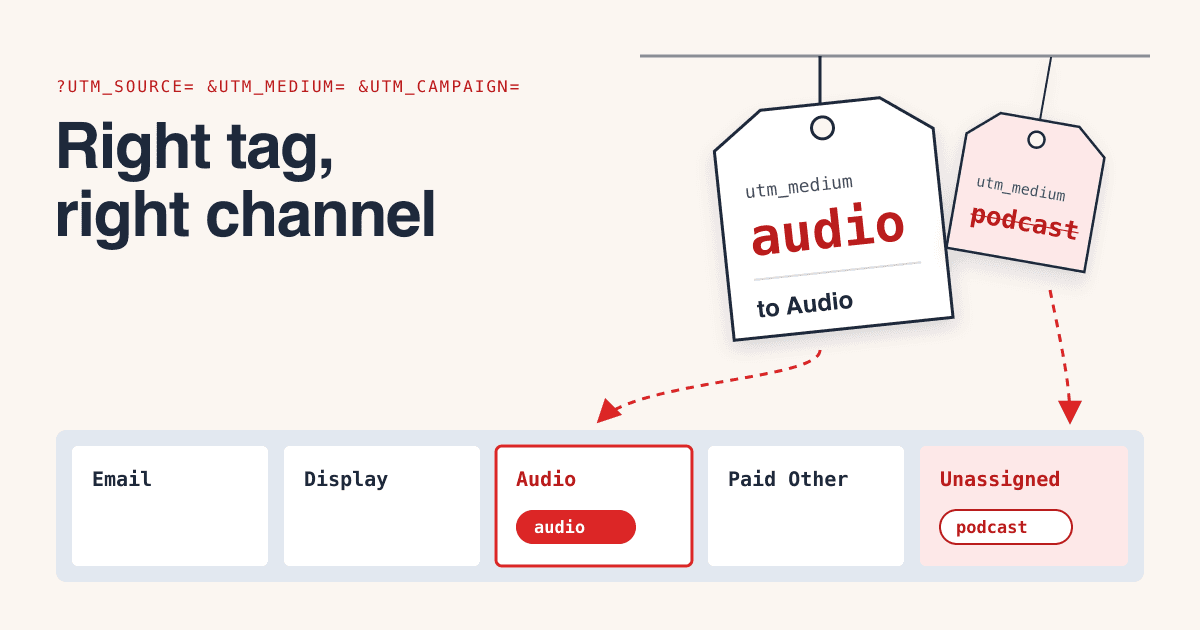
GA4 sorts every tagged click into a channel by reading two words you wrote yourself, utm_source and utm_medium, against a fixed list of rules, and a word that no rule knows sends the click to Unassigned, where nobody looks for it.
The short answer
Use the medium GA4 already has a channel for: email for a newsletter slot, audio for a podcast read, social for a creator's own post, paid_social for an ad run through a creator's account, display for a banner and affiliate for a pay-per-sale code. For a placement GA4 has no word for, such as a sponsored article, start the medium with paid so it lands in Paid Other. Never use sponsored, podcast, newsletter or influencer as a medium: unless the source is on one of Google's source lists, or the campaign name trips the Shopping or Cross-network rule, no default rule matches them (GA4 default channel group).
- 1The medium picks the channel in most cases. The source mainly matters when it is a social, video, search or shopping site.
- 2Write the source the way Google's list writes it:
instagram, notinsta. - 3Keep every value lowercase. Reports treat
Emailandemailas two rows. - 4Keep
shopandcross-networkout of campaign names unless you mean them.
What does each part of a tagged link tell GA4?
A UTM tag is a name-value pair added to the end of a link, after a ?, that tells Google Analytics where the visit came from. Google says to always use three of them, utm_source, utm_medium and utm_campaign, and strongly recommends utm_id as well; a parameter you leave out shows as (not set) in reports (GA4 Help: URL builders).
- utm_source
- Who sent the click: the newsletter, show, creator or site. Google's own example values are
google,newsletter4andbillboard. - utm_medium
- What kind of placement it was. This is the value most channel rules read.
- utm_campaign
- Which buy or promotion. Also read by the Shopping and Cross-network rules.
- utm_content
- Which creative or slot, so a top-of-issue link and a footer link stay apart.
- utm_id
- A campaign ID, for joining the clicks with your cost data later.
Case: values are case sensitive in reports (utm_source=google and utm_source=Google are different), so Google advises lowercase (GA4 Help: URL builders). The channel rules themselves are not case sensitive (GA4 default channel group): Email still lands in Email, but splits your rows.
Which utm_medium should each paid placement use?
One rule of thumb covers every buy: if GA4 has a channel for the format, use that channel's medium; if it has none, start the medium with paid. Each tag below matches one rule on Google's channel page, unless its note says otherwise.
| Placement | utm_source | utm_medium | GA4 channel |
|---|---|---|---|
| Newsletter slot | newsletter name | ||
| Podcast read | show name | audio | Audio |
| Creator's own post | instagram, tiktok | social | Organic Social |
| Ad through a creator's account | instagram, tiktok | paid_social | Paid Social (also meets Organic Social and Paid Other) |
| YouTube integration | youtube | video | Organic Video |
| Banner | site name | display | Display |
| Sponsored article, paid listing | site name | paid_article | Paid Other |
| Creator code, pay per sale | creator name | affiliate | Affiliates |
Which medium values send clicks to Unassigned?
Unassigned is the value GA4 uses when no channel rule matches a click (GA4 default channel group). The rack below drops common medium values into the slot their rule sends them to, when the source is a newsletter, show or site name that is not on Google's social, video, search or shopping lists.
email e-mail e_mail
Audio
audio
Display
display banner interstitial
Organic Social
social social-media sm
Organic Video
video
Paid Other
paid_article cpc ppc
Affiliates
affiliate
Referral
referral link
Unassigned
sponsored podcast newsletter influencer native
Two common values meet more than one rule: cpm fits Display and Paid Other (its letters contain cp), and paid_video fits Organic Video and Paid Other. Google publishes the rules but not the order it checks them in, so pick values that meet one rule only. That is why neither appears in the rack.
Why does the source name matter for creator and video buys?
Paid Social, Paid Video and Paid Search need the source to be on a list Google publishes, and Organic Social, Organic Video, Organic Search and both Shopping channels also accept a source from that list. The list Google offers for download has 819 entries. A newsletter, podcast or publisher name is usually not on it (a few publishers are, so look the name up), and then only the medium counts.
| Category | Entries |
|---|---|
| Social | 592 |
| Search | 129 |
| Shopping | 52 |
| Video | 46 |
Names that are on the list, and names that are not
On the list
instagram ig facebook fb tiktok linkedin pinterest reddit snapchat twitter t.co (social); youtube vimeo twitch (video)
Not on the list
insta x x.com threads spotify substack newsletter
Google's own UTM page suggests insta as a short source for Instagram (GA4 Help: URL builders), yet the downloaded list holds instagram, instagram.com and ig, not insta. Use the list's spelling, and look a name up before you send a link that depends on it.
Which campaign names change the channel?
Two patterns in the campaign name, not the medium, can change the channel. A name containing cross-network meets the Cross-network rule. A name that matches the Shopping pattern meets Organic Shopping, and with a paid medium, Paid Shopping (GA4 default channel group):
^(.*(([^a-df-z]|^)shop|shopping).*)$In words: the name contains shopping, or shop at the start or after a character that is not a letter from a to d or f to z. Run against that pattern, ignoring case as the channel rules do:
Matches: meets the Shopping rule
summer_shop shop_now fall-shopping eshop_launch coffeeshop
Does not match
workshop bookshop webshop fall_launch
coffeeshop matches because e is the one letter the pattern leaves out. If a buy is called "shop week", name the campaign week42_offer and keep the wording in utm_content.
How do you give creator and podcast buys their own channel?
Build a custom channel group: your own copy of the channels, where you set the rules and their order. In GA4, open Admin, then Data display, then Channel groups, and create a new group; it starts as a copy of the default one. Add a channel, for example "Creators", with a rule such as medium exactly matches creator, then drag it above Organic Social and save: traffic goes into the first channel, in the group's order, whose rule it matches. You need Editor access or higher, a standard property can have 2 custom groups of up to 50 channels each, and a custom group applies to past data too (GA4 Help: custom channel groups).
The default group stays as it is, so a creator medium is still Unassigned there. Use it only if your team reads the custom group.
What should you check before a tagged link goes to a publisher?
- Source, medium and campaign are all set, and the campaign has a
utm_id. - The medium is on the rack above and meets one rule, not two.
- A social or video source uses the list's spelling.
- Every value is lowercase, with underscores or hyphens instead of spaces.
- The campaign name has no
shoporcross-networkby accident. - Each slot or creative has its own
utm_content. - You opened the link once and saw the visit arrive in GA4's Realtime report.
- A day later, Traffic acquisition shows the click in the channel you expected.
Terms used on this page
- UTM tag
- A
utm_name-value pair added to a link so analytics can tell where a visit came from. - Default channel group
- GA4's fixed set of rule-based channels, such as Email, Audio and Paid Social. Its rules cannot be edited.
- Custom channel group
- Your own copy of the channels, with rules and an order you set.
- Unassigned
- The channel value GA4 gives a click that no rule matches.
- Whitelisted ad
- A paid ad a brand runs through a creator's account, with the creator's name on it.
Questions buyers ask about UTM tags
Is utm_medium=sponsored wrong?
Not wrong, but no default rule matches it, so those clicks show as Unassigned. Use the medium of the format you bought, or paid_ plus the format.
Should a paid newsletter slot use email or a paid medium?
email puts it in Email, next to your own sends, and the source tells them apart. paid_newsletter puts it in Paid Other, next to your other paid buys. Pick one and use it for every newsletter you buy.
Do capital letters break the channel?
No. The channel rules ignore case, but reports do not: Email and email become two rows of the same channel.
Can I fix clicks that already landed in Unassigned?
A custom channel group applies to past data, so a rule for the medium you used can pull those clicks into a channel of your own (custom channel groups). The default group does not change.
Do UTM tags show up in the landing page report?
No. GA4 leaves UTM parameters out of the "Landing page + query string" and "Page path + query string" dimensions and keeps them in Page location (URL builders).
Sources
- Google Analytics Help: [GA4] Default channel group (rules, case, Unassigned)
- Google: downloadable list of GA4 default-channel-group sources and categories (downloaded and counted 2026-10-21)
- Google Analytics Help: URL builders, collect campaign data with custom URLs (parameters, case, naming advice)
- Google Analytics Help: custom channel groups (order, limits, access, past data)
- Google Analytics: Campaign URL Builder