If you build only one display creative, make it the 300 x 250 medium rectangle, then add the 728 x 90 leaderboard for desktop and the 320 x 50 banner for phones. All three are on IAB Tech Lab's list of recommended fixed sizes, all three are accepted by Google Ads for uploaded image ads, and Google AdSense lists the first two among its top performing ad sizes.
Keep each file small (150 kB is the cap for an uploaded Google Ads image ad, and IAB's cap for the first load of a 300 x 250), and keep ads to at most 30% of the height of the main content on a mobile page. Chrome has filtered ads since 2018 on sites that repeatedly break the Better Ads Standards.
Which common ad sizes does each standard list?
There is no single official list. IAB Tech Lab publishes the industry standard, and the two Google products most publishers and advertisers meet publish their own. This table puts the three side by side for 13 common sizes. It is a selection, not each list in full: every source lists more sizes than these, so a size that is missing here may still be accepted. Check it in the sources linked in the caption.
| Size (px) | IAB fixed list | IAB initial load | Google AdSense | Google Ads upload |
|---|---|---|---|---|
| 300 x 250 | Yes | 150 kB | Top performing | Yes |
| 728 x 90 | Yes | 150 kB | Top performing | Yes |
| 320 x 50 | Yes | 50 kB | Supported | Yes |
| 300 x 50 | Yes | 50 kB | Not listed | Yes |
| 160 x 600 | Yes | 150 kB | Supported | Yes |
| 970 x 250 | Yes | 250 kB | Supported, limited supply | Yes |
| 300 x 1050 | Yes | 250 kB | Supported, limited supply | Yes |
| 970 x 90 | Yes, but see note | 200 kB | Supported | Yes |
| 300 x 600 | No: only in IAB's weight grid and as the stand-in for 1:2 | 200 kB (1:2 unit; grid says 250) | Top performing | Yes |
| 336 x 280 | No | 150 kB (grid) | Top performing | Yes |
| 320 x 100 | No | 50-75 kB (grid) | Top performing | Yes |
| 468 x 60 | No | 50 kB (grid) | Supported, limited supply | Yes |
| 120 x 60 | Yes | 50 kB | Not listed | Not listed |
Note on "(grid)" values: IAB's fixed-size table gives no cap for the sizes marked "(grid)", so we read them off its flexible sizing grid, which IAB says is for "innovative and custom ad formats that may not be part of IAB Ad Portfolio" and which counts pixels at double density (Fixed Size Ad Specifications, page 3). Treat them as estimates: the grid's first band ("Less than 180" thousand pixels) overlaps the next ("120-180"), so 320 x 100 falls in both. IAB's own tables also disagree for three sizes: for 728 x 90 and 970 x 90 the grid gives lower caps than the fixed table, and for 300 x 600 the grid gives 250 kB while the portfolio document names 300 x 600 as its 1:2 vertical unit with a 200 kB initial load (and 400 kB subload). We show the stricter 200 kB for 300 x 600.
Note on 970 x 90: the July 2017 portfolio document marks it "Delist", yet the same portfolio's flexible table and IAB's separate fixed-size specification still list it as "Super Leaderboard/ Pushdown". Both Google products accept it.
Our reading: a size that IAB lists and both Google products accept is a safe size to build. 300 x 600, 336 x 280 and 320 x 100 are not on IAB's fixed list, but AdSense calls them top performing, so a publisher selling through Google demand should still offer them. AdSense warns that the supply of ads is limited for 468 x 60, and for the large 970 x 250 and 300 x 1050.
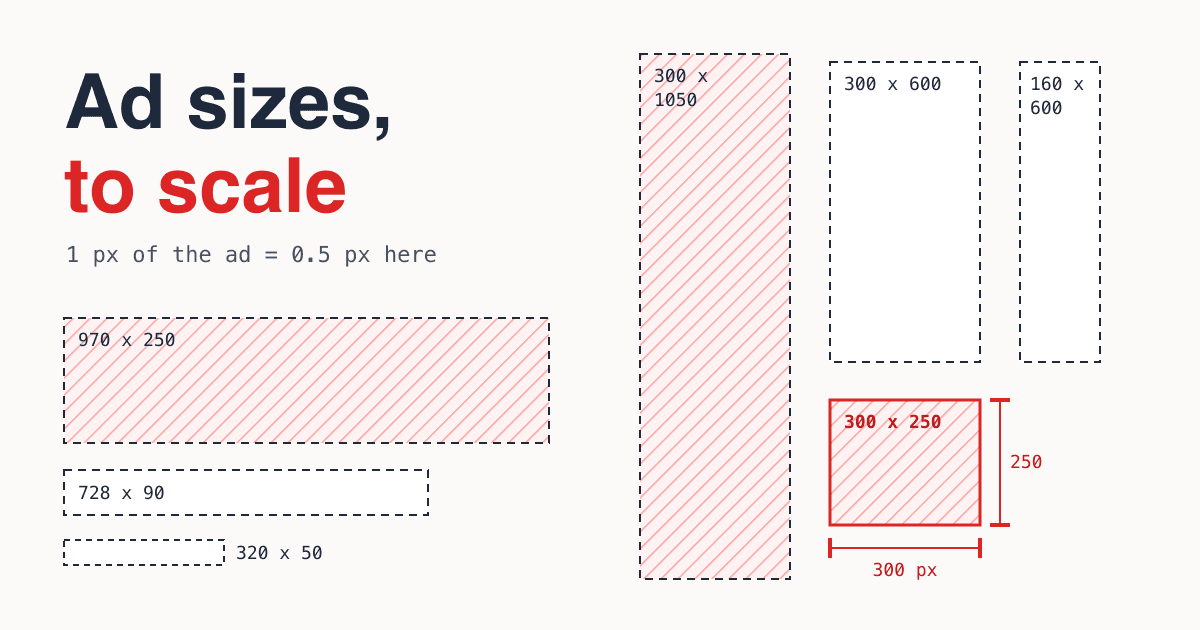
What do the standard sizes look like next to each other?
Here are ten of the sizes from the table drawn to one scale, so you can see what a buyer gets for each name (300 x 50, 468 x 60 and 120 x 60 are left out). The five in red are the ones Google AdSense calls top performing.
- 970 x 250 Billboard
- 970 x 90 Super leaderboard
- 728 x 90 Leaderboard
- 336 x 280 Large rectangle
- 300 x 250 Medium rectangle
- 320 x 100 Large mobile banner
- 320 x 50 Mobile banner
- 300 x 1050 Portrait
- 300 x 600 Half page
- 160 x 600 Skyscraper
How heavy can a display ad file be?
File weight is the size of the creative's own files and assets; ad server, measurement and verification files do not count. IAB Tech Lab sets a cap per size for the initial load, and a larger one for the "subload" that may follow once the page has loaded. Weights are counted "after files have been compressed into gzip format", and on 3G or slower connections IAB asks for files "30% less than recommended" (Fixed Size Ad Specifications).
- 50kBIAB initial load for a 320 x 50 or 300 x 50 phone banner (subload 100 kB)IAB Tech Lab
- 150kBIAB initial load for 300 x 250, 728 x 90 and 160 x 600; also the cap for any Google Ads uploaded image ad (GIF, JPG or PNG)IAB Tech Lab, Google Ads
- 250kBIAB initial load for the 970 x 250 billboard and 300 x 1050 portrait (subload 500 kB)IAB Tech Lab
The same IAB document caps an ad at ten file requests during the initial load and 30% CPU load, and allows unlimited weight only "after user-initiated interaction". Google Ads adds that animation "must be 30 seconds or shorter" and that an HTML5 or AMPHTML ad's ZIP may be up to 600 KB (Google Ads Help).
Should you build fixed sizes or flexible ratios?
IAB Tech Lab's New Ad Portfolio page says its new ad units "are based on aspect ratio and size range rather than fixed pixel sizes" (IAB New Ad Portfolio), and in 2017 IAB marked the classic sizes "in transition": 728 x 90 "to be replaced by 8x1 horizontal banner", 300 x 250 "to be replaced by 1x1" (portfolio, page 23). Nine years on, both Google pages above still list the fixed sizes. Our reading: most campaigns need both.
Fixed sizes
- One file per slot, pixel exact: what the designer saw is what runs.
- Needed for uploaded image ads: Google Ads accepts a fixed list of sizes.
- A separate file for every size you book, each under its weight cap.
Flexible ratios
- Units that "maintain their aspect ratio" and adjust to the screen (IAB flexible spec): 1:1, 1:2, 4:1, 6:1, 8:1 and more.
- Google's responsive display ads work the same way: you upload images (landscape 1.91:1 at 1200 x 628, square 1:1 at 1200 x 1200, each up to 5120 KB) and Google fits them to the slot (Google Ads Help).
- Fewer files, less control over the exact crop.
How much of a page may ads cover?
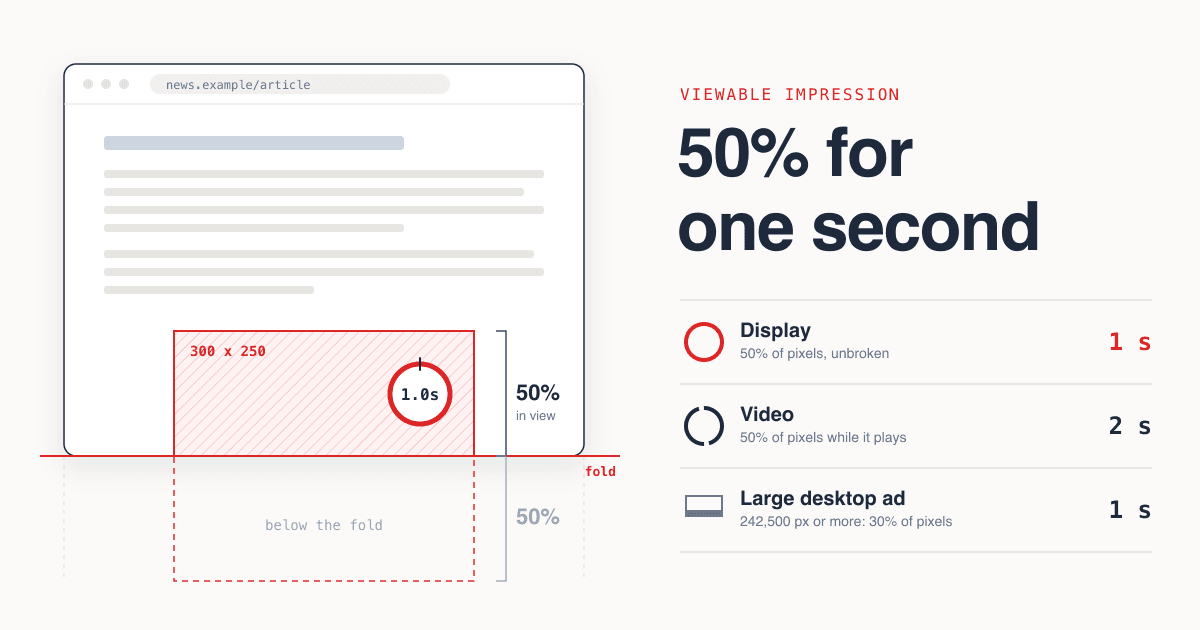
On a phone, at most 30% of the height of the page's main content. The Coalition for Better Ads lists "Ads that take up more than 30% of the vertical height of a page" as a failing experience on mobile, measured "against the main content portion of the page, not the viewport", and "All ad formats count toward ad density, including "sticky" ads and inline ads" (Better Ads Standards). On desktop the limit is ad density higher than 50%, or 30% when the page also has a sticky video ad (Better Ads Standards).
Ads: 14% + 16%= 30%
The other experiences on the desktop list are pop-up ads, auto-playing video ads with sound, prestitial ads with a countdown, and large sticky ads, which take up "more than 30% of the screen's real estate" (Better Ads Standards). You can see whether your site has been flagged in Google's Ad Experience Report.
When did Chrome start enforcing it?
- June 1, 2017
Google says Chrome will stop showing ads, "including those owned or served by Google", on sites that do not comply with the Better Ads Standards, starting in early 2018 (Chromium Blog).
- July 2017
IAB Tech Lab publishes the New Standard Ad Unit Portfolio, drawing on the Coalition's initial standards, with its LEAN principles: "lightweight, encrypted, AdChoices supported, and non-invasive" (portfolio, IAB Tech Lab).
- February 15, 2018
Chrome's ad filtering launches (Chromium Blog, 2018), on sites in North America and Europe (Chromium Blog, 2019).
- July 9, 2019
Chrome stops showing all ads on sites "in any country" that repeatedly display these disruptive ads (Chromium Blog).
What should a buyer send, and a publisher ask for?
- The core three: 300 x 250, 728 x 90 and 320 x 50. Add 300 x 600 and 970 x 250 if the site has a sidebar or a billboard slot.
- Each file under its cap: 150 kB for a Google Ads uploaded image ad (600 KB for an HTML5 or AMPHTML ZIP); for the banner sizes above, IAB's per-size limit, from 50 kB for a phone banner to 250 kB for a billboard.
- One file per booked size: a fixed slot shows a file of its own pixel size, so send every size on the order.
- Sharp on phones: Google Ad Manager lets you upload 1x, 1.5x and 2x versions of an image and picks one per device (Ad Manager Help).
- Animation within the rules: 30 seconds or shorter on Google Ads, no flashing on mobile.
- The page around it: publishers, count every ad slot on a mobile page, sticky banner included, before you add one more.
Questions people ask
What is the most common banner ad size?
We found no public source that counts every impression. 300 x 250 and 728 x 90 are the only sizes that are on IAB Tech Lab's fixed list, accepted by Google Ads uploads and called top performing by Google AdSense. Of the two, 300 x 250 is the one that also fits on a phone.
What is the best ad size for mobile?
320 x 50 is IAB's smartphone banner. Google AdSense ranks 320 x 100, the "large mobile banner", among its top performing sizes and suggests it as an alternative to 320 x 50 and 300 x 250.
Is a leaderboard ad 728 x 90?
Yes. IAB Tech Lab and Google both call 728 x 90 the leaderboard. AdSense says it "performs well if placed above the main content".
Do I need 2x images for retina screens?
Not by rule. Google Ad Manager makes it optional: you can upload separate 1x, 1.5x and 2x images and it picks the right one per device. IAB's weight grid already counts pixels at double density (2x) when it sets its weight bands.
Is 300 x 600 a standard IAB size?
It is not in IAB's fixed-size table. IAB uses it as the stand-in for its flexible 1:2 vertical unit and in its file weight grid. Google AdSense calls it "one of the fastest growing sizes by impressions" and Google Ads accepts it as the half-page ad.
Sources
- IAB Tech Lab, IAB New Ad Portfolio: Advertising Creative Guidelines (last updated February 7, 2024)
- IAB Tech Lab, IAB New Standard Ad Unit Portfolio (July 2017)
- IAB Tech Lab, Fixed Size Ad Specifications
- IAB Tech Lab, Flexible and LEAN Ads
- Google AdSense Help, Guide to ad sizes
- Google Ads Help, Uploaded display ads specifications
- Google Ads Help, Create a responsive display ad
- Google Ad Manager Help, Add an image creative
- Coalition for Better Ads, The Initial Better Ads Standards, Ad Density Higher Than 30% [Mobile], Large Sticky Ads [Mobile], Large Sticky Ads [Desktop]
- Google Web Tools Help, Introduction to the Ad Experience Report
- Chromium Blog: Improving advertising on the web (June 2017), Under the hood: How Chrome's ad filtering works (February 2018), Building a Better World Wide Web (January 2019)
728 x 90 house ad